
- Configuration: Questions about setting up AppKit, including project configuration, wallet visibility, and RPC customization.
- Features: Information about AppKit’s capabilities, including off-ramp support, multi-wallet address retrieval, and branding options.
- Technical: Technical details about project approval requirements and initialization constraints.
AppKit Configuration
Why am I seeing an 'Invalid App Configuration' error?
Why am I seeing an 'Invalid App Configuration' error?
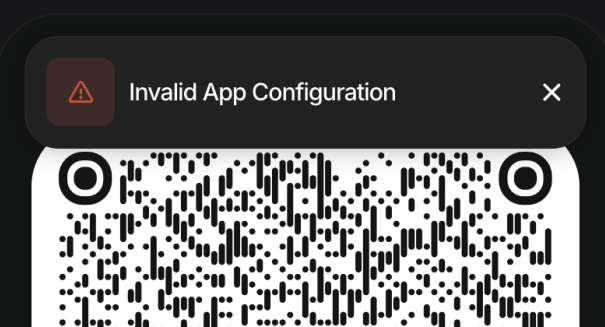
projectId is not configured correctly. To resolve this:- Create a valid project ID at https://dashboard.reown.com/
- Add it to your AppKit configuration:
- Ensure that you have added your domain to the allowed domains in your project settings. If you have not done so, you can do so by navigating to “Project Domains” on the Dashboard, clicking on “Configure Domains” and adding your domain.
Why can't I see any wallets in the modal and only see the 'Connect Wallet' title?
Why can't I see any wallets in the modal and only see the 'Connect Wallet' title?
Problem: Users only see the “Connect Wallet” title in the modal after clicking the connect button.Solution: This issue typically has two possible causes:
- Version Mismatch: Ensure all @reown libraries use the same version in your
package.json:
- Initialization Location: Call
createAppKitoutside of your component to ensure proper initialization:
How can I use custom RPCs with AppKit?
How can I use custom RPCs with AppKit?
You can use your own RPC by setting the AppKit will prioritize these URLs over the default ones.
customRpcUrls option in the AppKit configuration. This lets you define custom RPC URLs for specific chains. Each entry must follow the format:Features
When will Reown support off-ramp functionality?
When will Reown support off-ramp functionality?
Reown currently does not plan to support off-ramp functionality.
How do I get retrieve multiple addresses from multiple connected wallets?
How do I get retrieve multiple addresses from multiple connected wallets?
To retrieve addresses from multiple connected wallets, refer to our multichain example:Example using React SDK:
How do I remove the 'UX by Reown' branding?
How do I remove the 'UX by Reown' branding?
Currently, only enterprise clients can hide “UX by Reown” on the AppKit modal by adjusting this option on our Dashboard. If you are an enterprise client and would like to hide this branding, please contact sales@reown.com.
How do I increase my project's RPC limits?
How do I increase my project's RPC limits?
Reown currently provides 2.5 million requests per 30 days. If you wish to increase this limit, you need to upgrade to AppKit Pro.
Technical
Do I need to wait for Web3 app approval before using my projectId?
Do I need to wait for Web3 app approval before using my projectId?
No, dApps do not need approval in order to use your projectId.
Why are signatures longer in some cases?
Why are signatures longer in some cases?
Signatures can appear longer when using non-deployed smart accounts. These accounts include extra data in the signature to handle deployment and verification. Once the account is deployed, the signatures return to their normal size.
This happens when you connect with a social login but haven’t made a transaction yet. Before the first transaction, the smart account isn’t deployed, so the signature includes extra data for deployment and verification. After the first transaction, the account is deployed and signatures go back to normal size.You can always use viem’s verifyMessage to verify the signature in different formats.
How can I add my web wallet to the wallet list in WalletConnect?
How can I add my web wallet to the wallet list in WalletConnect?
Add your web wallet to WalletConnect by following the steps in this link: https://docs.reown.com/cloud/explorer-submission.
Can I reinitialize AppKit with different network configurations?
Can I reinitialize AppKit with different network configurations?
Currently,
createAppKit can only be called once during the application’s lifecycle.
It cannot be lazily initialized and then torn down for re-initialization.
This means you must pass in all the networks you plan to support during the initial setup.Error Codes
Error Codes
Below is a list of error codes you may encounter when using AppKit, along with their descriptions and recommended actions:
Support
How do I get technical support for AppKit?
How do I get technical support for AppKit?
Free tier AppKit customers only are only entitled to support via Discord. Please join the Discord server and create a forum post #developers-forum and the team will get back to you.AppKit Pro and Enterprise customers get priority support via dedicated channels.