> ## Documentation Index
> Fetch the complete documentation index at: https://reown-5552f0bb-devin-1759771246-appkit-1-8-9-docs.mintlify.site/llms.txt
> Use this file to discover all available pages before exploring further.
# Paymaster
Paymaster feature is currently in a limited access phase and only
available by invite. If you're interested in access, please [contact us](https://reown.com/contact).
## Accessing Reown Paymaster
1. Log in to your Cloud Account [here](https://dashboard.reown.com/sign-in).
2. Click on your Project, then select the "Paymaster" Tab.
## Creating a Policy
Click on "Add Policy" and follow the steps within the policy creation screen.
### 1. Select a Plan
#### Free Plan
If you select the free plan, you will have *unlimited* access to sponsoring on testnets. Currently, only Sepolia is supported.
#### Pay-As-You-Go
With the Pay-as-you-go plan, you will be asked to enter credit card information. *You will not be billed immediately*.
Instead you will be charged based on usage, with Paymaster Credits. This is
calculated using a simple formula:
* amount of gas sponsored + fee
Billing occurs monthly; however, if a threshold of 100 USD is reached, an
immediate charge will occur, and the billing cycle will reset.
### 2. Add Policy Basic Info
1. Write a descriptive name for your policy
2. Add a start date for your policy. The current date and time are selected by default. However, you can set a future date and time to align your policy's start with a campaign or similar event.
3. Optionally, add an end date, and your policy will automatically lapse on that date.
### 3. Select Chains
All supported chains are enabled by default, but you can deselect any chain to sponsor transactions only on specific chains.
#### Currently Supported Mainnet Chains
* Ethereum
* Polygon
* Avalanche
* Mantle
* Celo
* Optimism
* Base
* Zora
* Gnosis
* Metis
#### Currently Supported Testnet Chains
* Sepolia
### 4. Add Policy Logic
Policy logic can be updated in one of two ways:
1. No-code policy builder
2. JSON editor
There are distinct advantages to this:
1. You can maintain an auditable history of your policies by storing the JSON files for each policy.
2. You can auto-generate policies for your campaigns, as it's a straightforward JSON schema.
3. Policies are highly flexible, allowing you to chain conditional checks to target specific smart contracts, particular methods within a contract, expected gas limits, and more.
Once created, the policy will become active immediately if the start date has already passed, making it ready for use.
#### Using the no code builder
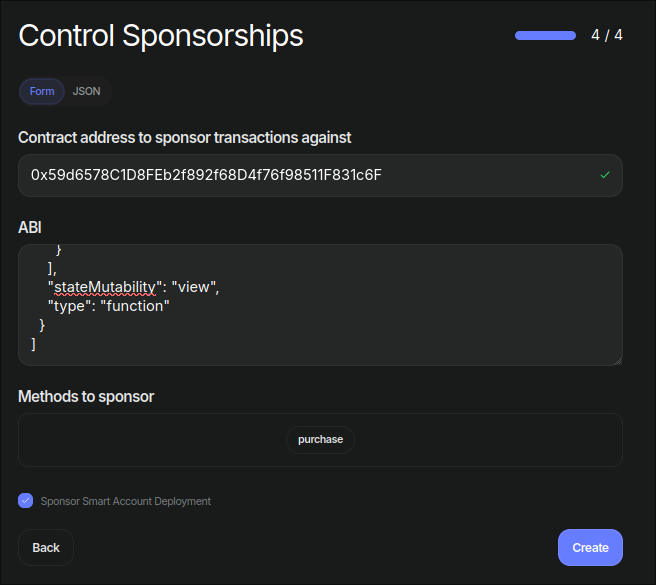 All that is required is to
1. Input the contract address
2. Paste the ABI
3. Select the methods you wish to sponsor via the drop down
4. *IMPORTANT*: If you would like to sponsor the deployment of smart accounts
on your app, tick the `Sponsor Smart Account Deployment` checkbox.
## Sponsoring transactions
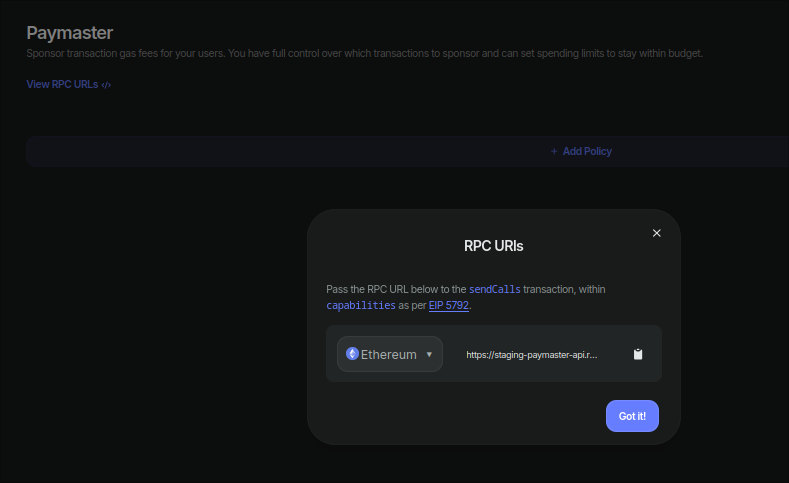
Based on [EIP 5792](https://github.com/ethereum/EIPs/blob/master/EIPS/eip-5792.md) and [ERC 7677](https://github.com/ethereum/ERCs/blob/master/ERCS/erc-7677.md), utilizing a paymaster is as simple as providing the paymaster RPC URL.
The Paymaster screen includes an `RPC URL` selector for chain-specific URLs. All
URLs follow the same format, varying only by chain ID, so you can generate the
URL in your Dapp based on the active chain.
All that is required is to
1. Input the contract address
2. Paste the ABI
3. Select the methods you wish to sponsor via the drop down
4. *IMPORTANT*: If you would like to sponsor the deployment of smart accounts
on your app, tick the `Sponsor Smart Account Deployment` checkbox.
## Sponsoring transactions
Based on [EIP 5792](https://github.com/ethereum/EIPs/blob/master/EIPS/eip-5792.md) and [ERC 7677](https://github.com/ethereum/ERCs/blob/master/ERCS/erc-7677.md), utilizing a paymaster is as simple as providing the paymaster RPC URL.
The Paymaster screen includes an `RPC URL` selector for chain-specific URLs. All
URLs follow the same format, varying only by chain ID, so you can generate the
URL in your Dapp based on the active chain.
 ### Policy Selection
By default, all policies will be validated in succession until one returns true.
There is the option of passing `policyId` in the optional to the RPC. This can
be sent by the dapp via the `context` field per [ERC 7677](https://github.com/ethereum/ERCs/blob/master/ERCS/erc-7677.md).
However - please note that different paymasters may accept `policyId` with a
different key or format. For Reown's Paymaster, that key is `policyId`.
```sh theme={null}
curl --location \
--header 'Content-Type: application/json' \
--data '{"method":"pm_getPaymasterData","params":[{
"sender": "0xb56e8f33dc5d32be80c32b8eb97081fa272488bb",
"nonce": "0x3b",
"initCode": "0x",
"callData": "0xc32b8eb97081fa272488bb058bb8eb970870f0728eb97081fa272488bb058bb8eb970870f072445675",
"callGasLimit": "0x0",
"verificationGasLimit": "0x0",
"preVerificationGas": "0x0",
"maxFeePerGas": "0x0",
"maxPriorityFeePerGas": "0x0"
}, "0x5FF137D4b0FDCD49DcA30c7CF57E578a026d2789", "0x24B44",
{
"policyId": "298191-ff1719-5a9c-abb4-40911aa123"
}],"jsonrpc":"2.0", "id": 1}'
```
## JSON Schema: A Practical Example Walkthrough
### Basics
The schema itself is a simple object representation of the following
> Is some key from a user operation equivalent to *(or some other comparison)* some value?
This is defined in `params` as such:
```json theme={null}
{
"key": "some_key",
"op": "equals",
"value": "some_value"
}
```
### Chaining Conditionals
The flexibility here lies in the ability to chain different conditionals together. For example, you can check if the User Op targets a specific smart contract and a particular function within that contract's ABI. Since these fields are encoded within a UserOp's `callData`, two different methods are needed to access this information:
1. `callDataMethodEquals`: Verifies that the `callData` targets a specific function
2. `callDataToEquals`: Verifies that the `callData` targets a specific contract
Essentially, we want to combine the following two conditions:
```json theme={null}
{
"key": "callData",
"op": "callDataToEquals",
"value": "0xa123cd918..."
}
```
```json theme={null}
{
"key": "callData",
"op": "callDataMethodEquals",
"value": "methodFoo"
}
```
To do this, we need to zoom out and see how to set the `params`:
```json theme={null}
{
// Rest of policy..
"params": {
"key": "callData",
"op": "callDataToEquals",
"value": "0xa123cd918..."
},
"ands": [
{
"params": {
"key": "callData",
"op": "callDataMethodEquals",
"value": "methodFoo"
}
}
]
}
```
The new field we introduced here is `ands`. The way the schema is designed, Each `params` object, can be
accompanied with an `ands` OR an `ors` field which is an array of more params that will require that they
either all pass as true, or only one of them is true, respectively.
A `params` object can not have both an `ors` and
an `ands` simultaneously. However, its "children" (the params in an `ands` or `ors`) can have different conditionals than their parent.
For example, to make it so that the above policy also passes for `methodBar` and `methodBaz`, it can be amended as follows:
```json theme={null}
{
// Rest of policy..
"params": {
"key": "callData",
"op": "callDataToEquals",
"value": "0xa123cd918..."
},
"ands": [
{
"params": {
"key": "callData",
"op": "callDataMethodEquals",
"value": "methodFoo"
}
"ors": [
{
"params": {
"key": "callData",
"op": "callDataMethodEquals",
"value": "methodBar"
}
},
{
"params": {
"key": "callData",
"op": "callDataMethodEquals",
"value": "methodBaz"
}
},
]
}
]
}
```
This essentially is a schema translation of
> The UserOp should target smart contract 0xa123.. and either use the methods `methodFoo` or `methodBar` or `methodBaz`.
Note that at the top it used `ands` and then used `ors` for the children. This is fully legal within the schema.
However, the following is incorrect :
```json theme={null}
{
// Rest of policy..
"params": {
"key": "callData",
"op": "callDataToEquals",
"value": "0xa123cd918..."
},
"ands": [
{
"params": {
"key": "callData",
"op": "callDataMethodEquals",
"value": "methodFoo"
}
}
],
"ors": [
{
"params": {
"key": "callData",
"op": "callDataMethodEquals",
"value": "methodBar"
}
},
{
"params": {
"key": "callData",
"op": "callDataMethodEquals",
"value": "methodBaz"
}
},
]
}
```
***In this case, the `ors` will be completely ignored. If both `ors` and `ands` are present, then the `ands` will take precedence.***
### ABI Parsing
For the policy to actually know how to read the `callData` it needs to know the smart contract's ABI.
For this we introduce 2 new fields. `policyStaticProps` and `metadata`. Both are essentially free range key-value
dictionaries used to store information within the policy to be accessed later. The key thing to note is that
values within `policyStaticProps` can be accessed from within `metadata`. This becomes invaluable with policies
that have multiple conditionals like the one above.
```json theme={null}
"policyStaticProps": {
"contract1": {
"abi": [...Contract ABI goes here]
}
}
"params": {
"key": "callData",
"op": "callDataMethodEquals",
"value": "methodBaz"
},
{
"metadata": {
"contractAbi": ""
}
}
```
Essentially here, `contractAbi` is a variable that `callDataMethodEquals` requires. To supplement its value, we use ``.
What `` means is essentially `policyStaticProps.contract1.abi`. The `<>` indicate that this value is coming from `policyStaticProps`.
Note that the values within `policyStaticProps` can be named anything. The only constraint is that `contractAbi` is named the same within the metadata
as that is what `callDataMethodEquals` will look for.
Extrapolating this to our running example above, the complete policy becomes:
```json theme={null}
{
"policyType": "useroperation_payload_control", /* currently the only one supported */
"policyStaticProps": {
"contract1": {
"abi": [...Contract ABI goes here]
}
}
"params": {
"key": "callData",
"op": "callDataToEquals",
"value": "0xa123cd918..."
},
"ands": [
{
"params": {
"key": "callData",
"op": "callDataMethodEquals",
"value": "methodFoo"
},
"metadata": {
"contractAbi": ""
}
}
],
"ors": [
{
"params": {
"key": "callData",
"op": "callDataMethodEquals",
"value": "methodBar"
},
"metadata": {
"contractAbi": ""
}
},
{
"params": {
"key": "callData",
"op": "callDataMethodEquals",
"value": "methodBaz"
},
"metadata": {
"contractAbi": ""
}
},
]
}
```
### Housekeeping
The final bit to making a valid policy is adding `metadata` to the root of your policy, to keep basic metadata like what chains to support, the startTime and endTime.
```json theme={null}
{
"metadata": {
"chainIds": [
1, // Etheruem
137, // Polygon
11155111 // Sepolia (Testnet)
],
"startTime": "2024-10-23T15:50:00.000Z",
"endTime": null
}
}
```
These only need to be manually set when communicating with the API.
By design, certain elements of the JSON policy are not editable in the UI. Those
being: `startTime`, `endTime` and `chainIds`. This is because they are edited in
the previous UI panels.
Adding this to the above gives us a complete and working policy.
### Complete Example Policy
The following is the culmination of all the above steps to create a complete policy.
In English, what this policy is saying is
> The policy starts on the 23rd of October 2024, does not expire and will support Ethereum, Polygon and Testnet.
> For a UserOp to pass this policy, it needs to be targeting smart contract `0xa123cd918...` **and** it has to be using
> One of the following methods from the contract: `methodFoo` **or** `methodBar` **or** `methodBaz`.
```json theme={null}
{
"policyType": "useroperation_payload_control", /* currently the only one supported */
"policyStaticProps": {
"contract1": {
"abi": [...Contract ABI goes here]
}
},
{
"metadata": {
"chainIds": [
1, // Etheruem
137, // Polygon
11155111 // Sepolia (Testnet)
],
"startTime": "2024-10-23T15:50:00.000Z",
"endTime": null
}
},
"params": {
"key": "callData",
"op": "callDataToEquals",
"value": "0xa123cd918..."
},
"ands": [
{
"params": {
"key": "callData",
"op": "callDataMethodEquals",
"value": "methodFoo"
},
"metadata": {
"contractAbi": ""
}
}
],
"ors": [
{
"params": {
"key": "callData",
"op": "callDataMethodEquals",
"value": "methodBar"
},
"metadata": {
"contractAbi": ""
}
},
{
"params": {
"key": "callData",
"op": "callDataMethodEquals",
"value": "methodBaz"
},
"metadata": {
"contractAbi": ""
}
},
]
}
```
## JSON Schema: Definitions
### `policyType`
The type of policy, currently only `useroperation_payload_control` is available.
### `policyStaticProps`
Key value pair used as data storage for the policy
### `params`
Where the core logic of a policy lives
#### `key`
The key within the UserOp to target, currently only EntryPoint v.07 is supported, so the available fields are:
1. `sender`
2. `nonce`
3. `callData`
4. `callGasLimit`
5. `verificationGasLimit`
6. `maxFeePerGas`
7. `maxPriorityFeePerGas`
#### `op`
The operation to apply within the params. Currently available:
1. `equals`: Exact 1:1 match with `value`
2. `lessThanOrEquals`: Is the numeric value less than or equals `value`
3. `callDataMethodEquals`: Within `callData`, is the `method` equal to a `value`
* requires `contractAbi` defined in `metadata`
4. `callDataToEquals`: Within `callData`, is the `to` equal to a `value`
#### `value`
The value to be compared to. Can be a string, number or boolean.
### `ands`
Array consisting of policies (with `policyType` and `policyStaticProps`
omitted)
### `ors`
Array consisting of policies (with `policyType` and `policyStaticProps`
omitted)
### `metadata`
Key value pair used as data storage for a single `params`
Special fields within `metadata`. At the root of a policy, there needs to be a `metadata` object defined.
It has to contain the following:
#### `startTime`
ISO datetime stamp of when to start policy
#### `endTime`
ISO datetime stamp of when to end policy
#### `chains`
Array of chain IDs to support. `number[]`
### Policy Selection
By default, all policies will be validated in succession until one returns true.
There is the option of passing `policyId` in the optional to the RPC. This can
be sent by the dapp via the `context` field per [ERC 7677](https://github.com/ethereum/ERCs/blob/master/ERCS/erc-7677.md).
However - please note that different paymasters may accept `policyId` with a
different key or format. For Reown's Paymaster, that key is `policyId`.
```sh theme={null}
curl --location \
--header 'Content-Type: application/json' \
--data '{"method":"pm_getPaymasterData","params":[{
"sender": "0xb56e8f33dc5d32be80c32b8eb97081fa272488bb",
"nonce": "0x3b",
"initCode": "0x",
"callData": "0xc32b8eb97081fa272488bb058bb8eb970870f0728eb97081fa272488bb058bb8eb970870f072445675",
"callGasLimit": "0x0",
"verificationGasLimit": "0x0",
"preVerificationGas": "0x0",
"maxFeePerGas": "0x0",
"maxPriorityFeePerGas": "0x0"
}, "0x5FF137D4b0FDCD49DcA30c7CF57E578a026d2789", "0x24B44",
{
"policyId": "298191-ff1719-5a9c-abb4-40911aa123"
}],"jsonrpc":"2.0", "id": 1}'
```
## JSON Schema: A Practical Example Walkthrough
### Basics
The schema itself is a simple object representation of the following
> Is some key from a user operation equivalent to *(or some other comparison)* some value?
This is defined in `params` as such:
```json theme={null}
{
"key": "some_key",
"op": "equals",
"value": "some_value"
}
```
### Chaining Conditionals
The flexibility here lies in the ability to chain different conditionals together. For example, you can check if the User Op targets a specific smart contract and a particular function within that contract's ABI. Since these fields are encoded within a UserOp's `callData`, two different methods are needed to access this information:
1. `callDataMethodEquals`: Verifies that the `callData` targets a specific function
2. `callDataToEquals`: Verifies that the `callData` targets a specific contract
Essentially, we want to combine the following two conditions:
```json theme={null}
{
"key": "callData",
"op": "callDataToEquals",
"value": "0xa123cd918..."
}
```
```json theme={null}
{
"key": "callData",
"op": "callDataMethodEquals",
"value": "methodFoo"
}
```
To do this, we need to zoom out and see how to set the `params`:
```json theme={null}
{
// Rest of policy..
"params": {
"key": "callData",
"op": "callDataToEquals",
"value": "0xa123cd918..."
},
"ands": [
{
"params": {
"key": "callData",
"op": "callDataMethodEquals",
"value": "methodFoo"
}
}
]
}
```
The new field we introduced here is `ands`. The way the schema is designed, Each `params` object, can be
accompanied with an `ands` OR an `ors` field which is an array of more params that will require that they
either all pass as true, or only one of them is true, respectively.
A `params` object can not have both an `ors` and
an `ands` simultaneously. However, its "children" (the params in an `ands` or `ors`) can have different conditionals than their parent.
For example, to make it so that the above policy also passes for `methodBar` and `methodBaz`, it can be amended as follows:
```json theme={null}
{
// Rest of policy..
"params": {
"key": "callData",
"op": "callDataToEquals",
"value": "0xa123cd918..."
},
"ands": [
{
"params": {
"key": "callData",
"op": "callDataMethodEquals",
"value": "methodFoo"
}
"ors": [
{
"params": {
"key": "callData",
"op": "callDataMethodEquals",
"value": "methodBar"
}
},
{
"params": {
"key": "callData",
"op": "callDataMethodEquals",
"value": "methodBaz"
}
},
]
}
]
}
```
This essentially is a schema translation of
> The UserOp should target smart contract 0xa123.. and either use the methods `methodFoo` or `methodBar` or `methodBaz`.
Note that at the top it used `ands` and then used `ors` for the children. This is fully legal within the schema.
However, the following is incorrect :
```json theme={null}
{
// Rest of policy..
"params": {
"key": "callData",
"op": "callDataToEquals",
"value": "0xa123cd918..."
},
"ands": [
{
"params": {
"key": "callData",
"op": "callDataMethodEquals",
"value": "methodFoo"
}
}
],
"ors": [
{
"params": {
"key": "callData",
"op": "callDataMethodEquals",
"value": "methodBar"
}
},
{
"params": {
"key": "callData",
"op": "callDataMethodEquals",
"value": "methodBaz"
}
},
]
}
```
***In this case, the `ors` will be completely ignored. If both `ors` and `ands` are present, then the `ands` will take precedence.***
### ABI Parsing
For the policy to actually know how to read the `callData` it needs to know the smart contract's ABI.
For this we introduce 2 new fields. `policyStaticProps` and `metadata`. Both are essentially free range key-value
dictionaries used to store information within the policy to be accessed later. The key thing to note is that
values within `policyStaticProps` can be accessed from within `metadata`. This becomes invaluable with policies
that have multiple conditionals like the one above.
```json theme={null}
"policyStaticProps": {
"contract1": {
"abi": [...Contract ABI goes here]
}
}
"params": {
"key": "callData",
"op": "callDataMethodEquals",
"value": "methodBaz"
},
{
"metadata": {
"contractAbi": ""
}
}
```
Essentially here, `contractAbi` is a variable that `callDataMethodEquals` requires. To supplement its value, we use ``.
What `` means is essentially `policyStaticProps.contract1.abi`. The `<>` indicate that this value is coming from `policyStaticProps`.
Note that the values within `policyStaticProps` can be named anything. The only constraint is that `contractAbi` is named the same within the metadata
as that is what `callDataMethodEquals` will look for.
Extrapolating this to our running example above, the complete policy becomes:
```json theme={null}
{
"policyType": "useroperation_payload_control", /* currently the only one supported */
"policyStaticProps": {
"contract1": {
"abi": [...Contract ABI goes here]
}
}
"params": {
"key": "callData",
"op": "callDataToEquals",
"value": "0xa123cd918..."
},
"ands": [
{
"params": {
"key": "callData",
"op": "callDataMethodEquals",
"value": "methodFoo"
},
"metadata": {
"contractAbi": ""
}
}
],
"ors": [
{
"params": {
"key": "callData",
"op": "callDataMethodEquals",
"value": "methodBar"
},
"metadata": {
"contractAbi": ""
}
},
{
"params": {
"key": "callData",
"op": "callDataMethodEquals",
"value": "methodBaz"
},
"metadata": {
"contractAbi": ""
}
},
]
}
```
### Housekeeping
The final bit to making a valid policy is adding `metadata` to the root of your policy, to keep basic metadata like what chains to support, the startTime and endTime.
```json theme={null}
{
"metadata": {
"chainIds": [
1, // Etheruem
137, // Polygon
11155111 // Sepolia (Testnet)
],
"startTime": "2024-10-23T15:50:00.000Z",
"endTime": null
}
}
```
These only need to be manually set when communicating with the API.
By design, certain elements of the JSON policy are not editable in the UI. Those
being: `startTime`, `endTime` and `chainIds`. This is because they are edited in
the previous UI panels.
Adding this to the above gives us a complete and working policy.
### Complete Example Policy
The following is the culmination of all the above steps to create a complete policy.
In English, what this policy is saying is
> The policy starts on the 23rd of October 2024, does not expire and will support Ethereum, Polygon and Testnet.
> For a UserOp to pass this policy, it needs to be targeting smart contract `0xa123cd918...` **and** it has to be using
> One of the following methods from the contract: `methodFoo` **or** `methodBar` **or** `methodBaz`.
```json theme={null}
{
"policyType": "useroperation_payload_control", /* currently the only one supported */
"policyStaticProps": {
"contract1": {
"abi": [...Contract ABI goes here]
}
},
{
"metadata": {
"chainIds": [
1, // Etheruem
137, // Polygon
11155111 // Sepolia (Testnet)
],
"startTime": "2024-10-23T15:50:00.000Z",
"endTime": null
}
},
"params": {
"key": "callData",
"op": "callDataToEquals",
"value": "0xa123cd918..."
},
"ands": [
{
"params": {
"key": "callData",
"op": "callDataMethodEquals",
"value": "methodFoo"
},
"metadata": {
"contractAbi": ""
}
}
],
"ors": [
{
"params": {
"key": "callData",
"op": "callDataMethodEquals",
"value": "methodBar"
},
"metadata": {
"contractAbi": ""
}
},
{
"params": {
"key": "callData",
"op": "callDataMethodEquals",
"value": "methodBaz"
},
"metadata": {
"contractAbi": ""
}
},
]
}
```
## JSON Schema: Definitions
### `policyType`
The type of policy, currently only `useroperation_payload_control` is available.
### `policyStaticProps`
Key value pair used as data storage for the policy
### `params`
Where the core logic of a policy lives
#### `key`
The key within the UserOp to target, currently only EntryPoint v.07 is supported, so the available fields are:
1. `sender`
2. `nonce`
3. `callData`
4. `callGasLimit`
5. `verificationGasLimit`
6. `maxFeePerGas`
7. `maxPriorityFeePerGas`
#### `op`
The operation to apply within the params. Currently available:
1. `equals`: Exact 1:1 match with `value`
2. `lessThanOrEquals`: Is the numeric value less than or equals `value`
3. `callDataMethodEquals`: Within `callData`, is the `method` equal to a `value`
* requires `contractAbi` defined in `metadata`
4. `callDataToEquals`: Within `callData`, is the `to` equal to a `value`
#### `value`
The value to be compared to. Can be a string, number or boolean.
### `ands`
Array consisting of policies (with `policyType` and `policyStaticProps`
omitted)
### `ors`
Array consisting of policies (with `policyType` and `policyStaticProps`
omitted)
### `metadata`
Key value pair used as data storage for a single `params`
Special fields within `metadata`. At the root of a policy, there needs to be a `metadata` object defined.
It has to contain the following:
#### `startTime`
ISO datetime stamp of when to start policy
#### `endTime`
ISO datetime stamp of when to end policy
#### `chains`
Array of chain IDs to support. `number[]`