> ## Documentation Index
> Fetch the complete documentation index at: https://reown-5552f0bb-devin-1759771246-appkit-1-8-9-docs.mintlify.site/llms.txt
> Use this file to discover all available pages before exploring further.
# AppKit FAQs
This FAQ section covers common questions and solutions for using AppKit. The questions are organized into three main categories:
* **Configuration**: Questions about setting up AppKit, including project configuration, wallet visibility, and RPC customization.
* **Features**: Information about AppKit's capabilities, including off-ramp support, multi-wallet address retrieval, and branding options.
* **Technical**: Technical details about project approval requirements and initialization constraints.
## AppKit Configuration
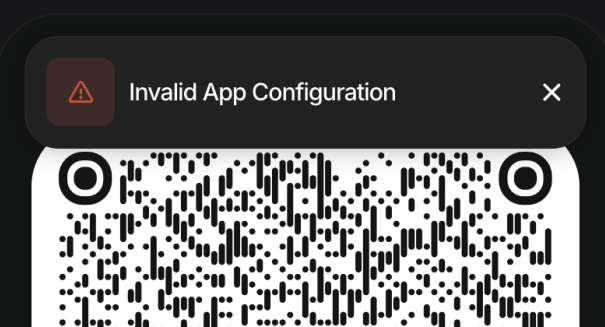 This error typically occurs when the `projectId` is not configured correctly. To resolve this:
1. Create a valid project ID at [https://dashboard.reown.com/](https://dashboard.reown.com/)
2. Add it to your AppKit configuration:
```javascript theme={null}
const modal = createAppKit({
...
projectId: "..." // Add your valid projectId here
});
```
3. Ensure that you have added your domain to the allowed domains in your project settings. If you have not done so, you can do so by navigating to **"Project Domains"** on the Dashboard, clicking on **"Configure Domains"** and adding your domain.
This can happen if your device is unable to reach the [WalletConnect relay service](https://relay.walletconnect.org).
If you see an error like:
```bash theme={null}
SocketException: Failed host lookup: 'relay.walletconnect.org' (OS Error: No address associated with hostname, errno = 7)
```
It usually means your connection is blocked by your VPN or network.
### Common causes and steps to resolve:
1. **VPN or Firewall settings**
* Some VPNs may block access to the relay service.
* If you are using a VPN (e.g., Windscribe), try:
* Switching the VPN protocol to **WStunnel**.
* Turning **off the Firewall toggle** in your VPN settings.
2. **Network restrictions**
* If you’re on a restricted network (e.g., public Wi-Fi, corporate network, or in a restricted country), the relay service may be blocked.
* Try switching to a different ISP or network.
3. **Connectivity issues**
* Confirm that you can reach `relay.walletconnect.org`.
* A 100% packet loss when pinging may indicate the service is blocked on your network.
**Problem**: Users only see the "Connect Wallet" title in the modal after clicking the connect button.
**Solution**: This issue typically has two possible causes:
1. **Version Mismatch**: Ensure all @reown libraries use the same version in your `package.json`:
```json theme={null}
{
"dependencies": {
"@reown/appkit": "1.7.8",
"@reown/appkit-adapter-wagmi": "1.7.8"
// ... other dependencies
}
}
```
2. **Initialization Location**: Call `createAppKit` outside of your component to ensure proper initialization:
```javascript theme={null}
// Create modal
createAppKit({
adapters: [wagmiAdapter],
...generalConfig,
features: {
analytics: true // Optional - defaults to your Cloud configuration
}
})
export function App() {
return (
)
}
```
You can use your own RPC by setting the `customRpcUrls` option in the AppKit configuration. This lets you define custom RPC URLs for specific chains. Each entry must follow the format:
```javascript theme={null}
customRpcUrls: {
[ChainId.Ethereum]: 'https://your.custom.rpc.url',
[ChainId.Polygon]: 'https://your.polygon.rpc.url'
}
```
AppKit will prioritize these URLs over the default ones.
## Features
Reown currently does not plan to support off-ramp functionality.
To retrieve addresses from multiple connected wallets, refer to our multichain example:
* [Live Demo](https://appkit-web-examples-react-multichain.reown.com/)
* [Source Code](https://github.com/reown-com/appkit-web-examples/tree/main/react/react-multichain)
Example using React SDK:
```javascript theme={null}
import { useAppKitAccount } from '@reown/appkit/react'
// Get account states for different chains
const eip155AccountState = useAppKitAccount({ namespace: 'eip155' })
const solanaAccountState = useAppKitAccount({ namespace: 'solana' })
```
```javascript theme={null}
<>
EVM Address: {eip155AccountState.address}
This error typically occurs when the `projectId` is not configured correctly. To resolve this:
1. Create a valid project ID at [https://dashboard.reown.com/](https://dashboard.reown.com/)
2. Add it to your AppKit configuration:
```javascript theme={null}
const modal = createAppKit({
...
projectId: "..." // Add your valid projectId here
});
```
3. Ensure that you have added your domain to the allowed domains in your project settings. If you have not done so, you can do so by navigating to **"Project Domains"** on the Dashboard, clicking on **"Configure Domains"** and adding your domain.
This can happen if your device is unable to reach the [WalletConnect relay service](https://relay.walletconnect.org).
If you see an error like:
```bash theme={null}
SocketException: Failed host lookup: 'relay.walletconnect.org' (OS Error: No address associated with hostname, errno = 7)
```
It usually means your connection is blocked by your VPN or network.
### Common causes and steps to resolve:
1. **VPN or Firewall settings**
* Some VPNs may block access to the relay service.
* If you are using a VPN (e.g., Windscribe), try:
* Switching the VPN protocol to **WStunnel**.
* Turning **off the Firewall toggle** in your VPN settings.
2. **Network restrictions**
* If you’re on a restricted network (e.g., public Wi-Fi, corporate network, or in a restricted country), the relay service may be blocked.
* Try switching to a different ISP or network.
3. **Connectivity issues**
* Confirm that you can reach `relay.walletconnect.org`.
* A 100% packet loss when pinging may indicate the service is blocked on your network.
**Problem**: Users only see the "Connect Wallet" title in the modal after clicking the connect button.
**Solution**: This issue typically has two possible causes:
1. **Version Mismatch**: Ensure all @reown libraries use the same version in your `package.json`:
```json theme={null}
{
"dependencies": {
"@reown/appkit": "1.7.8",
"@reown/appkit-adapter-wagmi": "1.7.8"
// ... other dependencies
}
}
```
2. **Initialization Location**: Call `createAppKit` outside of your component to ensure proper initialization:
```javascript theme={null}
// Create modal
createAppKit({
adapters: [wagmiAdapter],
...generalConfig,
features: {
analytics: true // Optional - defaults to your Cloud configuration
}
})
export function App() {
return (
)
}
```
You can use your own RPC by setting the `customRpcUrls` option in the AppKit configuration. This lets you define custom RPC URLs for specific chains. Each entry must follow the format:
```javascript theme={null}
customRpcUrls: {
[ChainId.Ethereum]: 'https://your.custom.rpc.url',
[ChainId.Polygon]: 'https://your.polygon.rpc.url'
}
```
AppKit will prioritize these URLs over the default ones.
## Features
Reown currently does not plan to support off-ramp functionality.
To retrieve addresses from multiple connected wallets, refer to our multichain example:
* [Live Demo](https://appkit-web-examples-react-multichain.reown.com/)
* [Source Code](https://github.com/reown-com/appkit-web-examples/tree/main/react/react-multichain)
Example using React SDK:
```javascript theme={null}
import { useAppKitAccount } from '@reown/appkit/react'
// Get account states for different chains
const eip155AccountState = useAppKitAccount({ namespace: 'eip155' })
const solanaAccountState = useAppKitAccount({ namespace: 'solana' })
```
```javascript theme={null}
<>
EVM Address: {eip155AccountState.address}
Solana Address: {solanaAccountState.address}
```
Currently, only enterprise clients can hide "UX by Reown" on the AppKit modal by adjusting this option on our Dashboard. If you are an enterprise client and would like to hide this branding, please contact [sales@reown.com](mailto:sales@reown.com).
Reown currently provides 2.5 million requests per 30 days. If you wish to increase this limit, you need to upgrade to AppKit Pro.
## Technical
No, dApps do not need approval in order to use your projectId.
Signatures can appear longer when using non-deployed smart accounts. These accounts include extra data in the signature to handle deployment and verification. Once the account is deployed, the signatures return to their normal size.
This happens when you connect with a social login but haven’t made a transaction yet. Before the first transaction, the smart account isn’t deployed, so the signature includes extra data for deployment and verification. After the first transaction, the account is deployed and signatures go back to normal size.
You can always use [viem's verifyMessage](https://viem.sh/docs/actions/public/verifyMessage) to verify the signature in different formats.
Add your web wallet to WalletConnect by following the steps in this link: [https://docs.reown.com/cloud/explorer-submission](https://docs.reown.com/cloud/explorer-submission).
Currently, `createAppKit` can only be called once during the application's lifecycle.
It cannot be lazily initialized and then torn down for re-initialization.
This means you must pass in all the networks you plan to support during the initial setup.
Below is a list of error codes you may encounter when using AppKit, along with their descriptions and recommended actions:
| Code | Message | Action |
| ------- | ------------------------- | ------------------------------------------------------------------------------------------------------------------------------------------------------ |
| APKT001 | Network Not Found | We couldn't recognize the specified network. Make sure it's included in the `networks` array of your `createAppKit` config. |
| APKT002 | Invalid App Configuration | The origin isn't in your allowlist. Update your allowed domains at [https://dashboard.reown.com](https://dashboard.reown.com). |
| APKT003 | Wallet Load Failed | We couldn't load the embedded wallet. This might be a network or server issue. Check your connection and try again, or contact support if it persists. |
| APKT004 | Wallet Request Timeout | The wallet didn't respond in time. Check your network and try again. If the issue continues, contact support. |
| APKT005 | Unverified Domain | The embedded wallet didn't load. Please verify your domain at [https://dashboard.reown.com](https://dashboard.reown.com). |
| APKT006 | Session Expired | Your session has expired or is invalid. Please check your device's date and time, then reconnect. |
| APKT007 | Invalid Project ID | The project ID is invalid. You can find or create a valid one at [https://dashboard.reown.com](https://dashboard.reown.com). |
| APKT008 | Project ID Missing | No project ID was found. Set one up in your config at [https://dashboard.reown.com](https://dashboard.reown.com). |
| APKT009 | Server Error | We couldn't load your App Configuration. Check your network and try again. Contact support if it keeps happening. |
| APKT010 | Rate Limited | Too many requests for App Configuration. Please wait a few minutes and try again. Reach out to support if needed. |
## Support
Free tier AppKit customers only are only entitled to support via [Discord](https://discord.gg/reown). Please join the Discord server and create a forum post **#developers-forum** and the team will get back to you.
AppKit Pro and Enterprise customers get priority support via dedicated channels.